What Kubernetes actually does
Kubernetes is a container orchestration tool. It decides where each container runs, restarts it when it dies, and helps you run the same app in different environments.
I needed it because development moved from monoliths to microservices, and nobody can babysit hundreds of containers by hand. What it gives you is scaling, self-healing and rolling updates. It reduces downtime, but it doesn’t promise zero downtime. That still depends on replicas, health checks and how you deploy.
Components
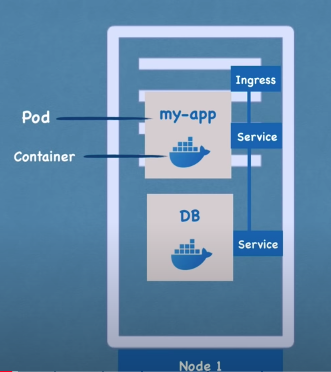
Pod
The smallest unit you deploy. It wraps one or more containers, and usually it is one main container.
Every pod gets its own IP on the cluster network. That IP changes whenever the pod is recreated, so you don’t point anything at it directly. That is why services exist.
Service
A service gives a set of pods one stable address and load balances across them. It finds its pods by label. The types are:
- ClusterIP: internal only, the default. The app talks to the database this way.
- NodePort: opens a port on every node.
- LoadBalancer: asks the cloud provider for an external load balancer.
- ExternalName: a DNS alias to something outside the cluster.
For HTTP routing from outside there is Ingress (networking.k8s.io/v1). The API is frozen and Gateway API is the successor, so new setups should look at that first.
ConfigMap and Secret
Both keep configuration out of the image. A ConfigMap holds plain settings like a database URL. A Secret holds things like passwords.
Secrets are only base64-encoded, which is not encryption. By default they are also stored unencrypted in etcd, so turn on encryption at rest and lock down who can read them.
Storage
Kubernetes doesn’t store your data. It gives you PersistentVolumes, PersistentVolumeClaims and StorageClasses, and a CSI driver does the real work against local disk or cloud storage. A pod claims a volume and the data outlives the pod.
Workload controllers
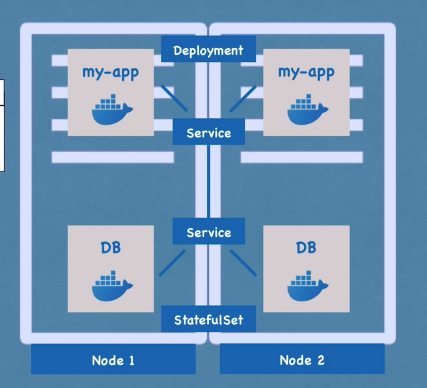
A pod on its own is not restarted somewhere else when its node dies. A controller keeps a set of replicas running from a pod template.
- Deployment: for stateless apps.
- StatefulSet: for pods that need a stable identity and their own storage. Rule of thumb, databases go here, although many people run them outside the cluster or through an operator.
Architecture
A cluster has a control plane and worker nodes. A node is a machine, a VM or a physical box.
Worker node
Each node runs your pods plus three things:
- Container runtime: runs the containers. The kubelet talks to it over CRI, and in practice it is containerd or CRI-O. Dockershim was removed in 1.24 (2022), so Docker itself is no longer the runtime. Images built with Docker still run fine.
- kubelet: the node agent. It registers the node with the API server and runs the pods assigned to it.
- kube-proxy: keeps the network rules that route service traffic to pods. Some CNI plugins replace it, so it isn’t always there.
Control plane
This used to be called the master node. It runs:
- kube-apiserver: the entry point. Everything, kubectl included, goes through it.
- etcd: key-value store holding the cluster state.
- kube-scheduler: picks a node for each new pod and writes that choice back through the API server. It never talks to the kubelet directly.
- kube-controller-manager: runs the controllers. Each one compares desired state with actual state and acts on the difference, for example creating a pod when a replica is missing.
- cloud-controller-manager: the part that talks to the cloud provider for load balancers, nodes and routes. Absent on a local cluster.
Usage
For local work I use Minikube, a single-node cluster that runs both control plane and worker processes. With --driver=docker it runs in a container. Other drivers use a VM.
kubectl is the command line client for any cluster. You can install it separately, or use minikube kubectl -- and skip the install.
Minikube commands
minikube start --driver=docker
minikube status
minikube dashboard   # opens the web dashboard
minikube stop
minikube delete
kubectl basics
kubectl cluster-info
kubectl get all
kubectl get nodes          # Ready means the node can host pods
kubectl get pods
kubectl get deployment
kubectl get replicaset
kubectl get pod -o wide    # more detail
kubectl top pods shows CPU and memory, but only with metrics-server installed. On Minikube: minikube addons enable metrics-server.
Everything is namespaced. Without a flag you are in default. Use -n <namespace> to look elsewhere.
You rarely create a pod yourself. You create a deployment and it creates a ReplicaSet, which creates the pods. kubectl run does make a bare pod, but a bare pod has nothing to bring it back.
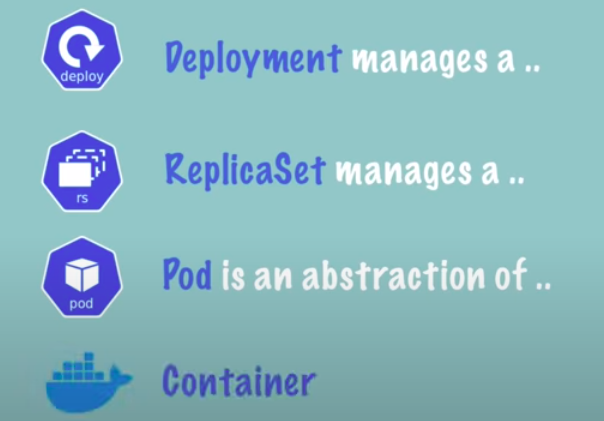
You only touch the deployment. Everything below it is handled for you.
kubectl create deployment nginx-depl --image=nginx
kubectl edit deployment nginx-depl
kubectl delete deployment nginx-depl
For debugging:
kubectl logs <pod-name>
kubectl describe pod <pod-name>
kubectl exec -it <pod-name> -- /bin/sh
Services and scaling:
kubectl expose deployment nginx-depl --port=80
kubectl get services
kubectl describe service nginx-depl
kubectl scale deployment/nginx-depl --replicas=4
Pods sit on a private network, visible to other pods and services in the cluster but not from outside. kubectl proxy starts a local proxy to the API server, so you can reach the API from your machine. Stop it with Ctrl-C. It prints nothing while it runs, so use a second terminal.
Config files
kubectl apply -f file.yaml    # create or update
kubectl delete -f file.yaml
A config file has these parts:
kind is what you are building, like a Deployment or a Service. metadata is the name and labels. spec is the specification, and it differs per kind. In a Deployment, spec.template is the blueprint of the pods, with its own metadata and spec.
A service picks its pods with a selector that matches their labels. For ports:
- port: the service’s own port
- targetPort: the container port the service forwards to
- containerPort: the port the container listens on
Kubernetes also adds a status section. It holds the actual state, and the controllers work to bring that in line with your spec. The state itself lives in etcd.
apiVersion: apps/v1
kind: Deployment
metadata:
  name: nginx-deployment
  labels:
    app: nginx
spec:
  replicas: 2
  selector:
    matchLabels:
      app: nginx
  template:
    metadata:
      labels:
        app: nginx
    spec:
      containers:
      - name: nginx
        image: nginx:1.27
        ports:
        - containerPort: 80
apiVersion: v1
kind: Service
metadata:
  name: nginx-service
spec:
  selector:
    app: nginx
  ports:
    - protocol: TCP
      port: 80
      targetPort: 80
Other commands
minikube service <name-of-service>   # open a service from outside the cluster

# point your Docker CLI at the Docker daemon inside Minikube
eval $(minikube docker-env)

echo -n <password> | base64          # encodes, does not encrypt
The docker-env change only lasts for that shell. A new terminal goes back to your own Docker daemon.