How a letter becomes bytes
UTF-8 Everywhere Manifesto https://utf8everywhere.org/
What Every Programmer Absolutely, Positively Needs to Know About Encodings and Character Sets to Work With Text If you are dealing with text in a computer, you need to know about encodings. https://kunststube.net/encoding/
Unicode, UTF8 & Character Sets: The Ultimate Guide, Smashing Magazine This article relies heavily on numbers and aims to provide an understanding of character sets, Unicode, UTF-8 and the various problems that can arise. https://www.smashingmagazine.com/2012/06/all-about-unicode-utf8-character-sets/
The Absolute Minimum Every Software Developer Absolutely, Positively Must Know About Unicode and Character Sets (No Excuses!) Ever wonder about that mysterious Content-Type tag? https://www.joelonsoftware.com/2003/10/08/the-absolute-minimum-every-software-developer-absolutely-positively-must-know-about-unicode-and-character-sets-no-excuses/
Strings, bytes, runes and characters in Go - The Go Programming Language How strings work in Go, and how to use them. https://go.dev/blog/strings
Everything a computer stores ends up as 0s and 1s: booleans, numbers, text, images, video. This post is about the text part, which turned out to be less simple than I expected. These are my notes from reading up on it.
A boolean is one bit of information, 1 for true and 0 for false. In memory it usually takes a whole byte, because a byte is the smallest thing you can address.
Numbers can be written in octal, decimal or hex, but they are all binary underneath. Negative integers are stored as two’s complement in practice, not as a sign bit plus a magnitude. The width is your choice: 8, 16, 32 or 64 bits.
Characters are the hard part. It’s not all ASCII.
Character encoding
A string is a collection of characters. In Go it is really a series of bytes, and I’ll get to that difference below. How a language handles characters varies, so I’ll keep it general for now.
ASCII
The practical way to store a character is to give it a number and store that number in binary. To read it back, you reverse the process with a parser that knows the mapping. ASCII is that mapping. It was standardized in the 1960s (ASA X3.2 in 1963, revised in 1967 and 1968). IBM went its own way with EBCDIC.
With 7 bits you get 128 characters. That fits English letters in both cases, digits, punctuation and some control characters. Control characters don’t print. They control the text, like Backspace (BS), Horizontal Tab (HT) and Carriage Return (CR).
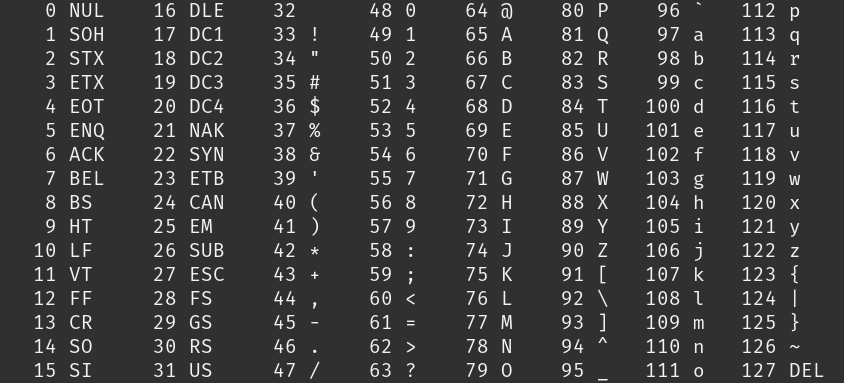
I wondered why the letters are ordered the way they are. A Stack Overflow answer said it makes conversion easy.
The digit ‘2’ is 0110010. The low four bits, 0010, are the number two. So the digits 0 to 9 are 0x30 to 0x39, and you get the value by masking off the high bits.
The letter ‘A’ is 1000001. The low five bits, 00001, are its position in the alphabet.
‘a’ is 1100001. It differs from ‘A’ by one bit (0x20, the second bit from the left), so flipping that bit switches the case.
All of this only works for English. Other languages needed something else.
Code pages
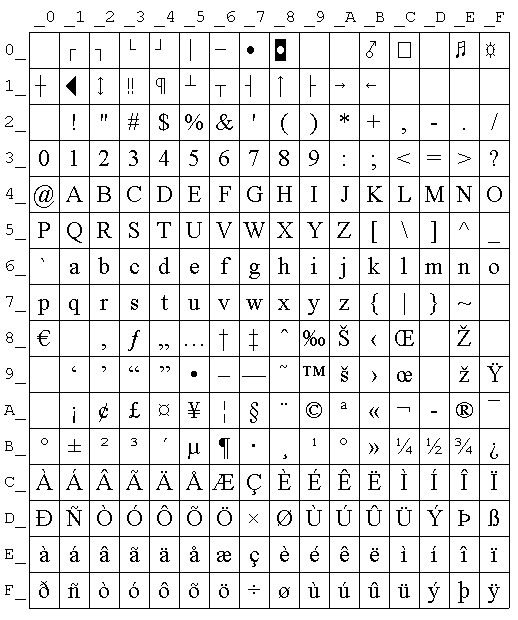
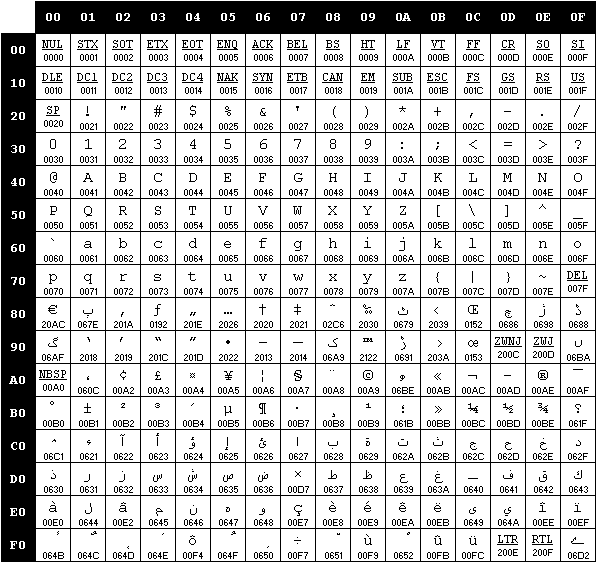
ASCII uses 7 bits, but a byte has 8. The spare bit gives 128 more slots. Each language filled them with its own alphabet. A code page keeps the first 128 for ASCII and uses the upper half for the language’s letters. That was enough for European languages and Arabic, among others. In a single-byte code page one character is one byte. That stops being true later.
Two examples. CP-1252 for European accents:
CP-1256 for Arabic:
The catch is that the reader has to be told which code page the bytes use. The same byte means different letters in different pages.
Some Asian languages have far too many characters for one byte, so systems invented double-byte encodings. Those were never universal, and with the internet the need for one scheme covering every language got obvious.
Unicode
Unicode also gives each character a number, called a code point. How that number becomes bytes is a separate decision.
The code space is split into 17 planes, the basic multilingual plane plus 16 supplementary ones, each with 2^16 = 65,536 code points. That makes 17 × 65,536 = 1,114,112, so the highest code point is U+10FFFF. The cap exists because of UTF-16 surrogates, which I’ll get to. It’s enough for the scripts in use today, plus emoji and a lot of symbols.
Code points are written U+ followed by 4 to 6 hex digits. ‘A’ is U+0041, ‘ب’ is U+0628 and 😀 is U+1F600. The biggest value needs 21 bits. The full table is at symbl.
The encoding decides how many bytes a code point takes. The common ones are UTF-32, UTF-16 and UTF-8. UTF-32 always uses 4 bytes. UTF-16 uses 2 bytes for most characters and 4 for the rest, as a pair of 16-bit units called a surrogate pair.
UTF-8
UTF-8 uses 1 to 4 bytes per character, and it is backward compatible with ASCII. An ASCII text is already valid UTF-8, so a parser that reads one byte as one character still works for it. That is a big part of why UTF-8 won on the internet.
How does the parser know whether a character is 1, 2, 3 or 4 bytes?
- In the first byte of a multibyte sequence, the number of leading 1s is the number of bytes, followed by a 0. A 2-byte sequence starts with
110. - Every following byte starts with
10.
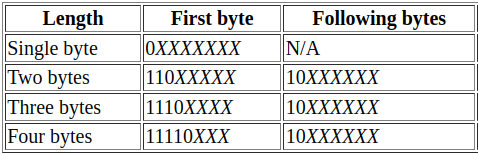
That also answers why 4 bytes (32 bits) don’t give 2^32 characters. The marker bits eat space. The payload is 7 bits for 1 byte, 11 for 2, 16 for 3 and 21 for 4. 21 bits would reach 2,097,151, but Unicode stops at U+10FFFF anyway.
‘ب’ is U+0628, which UTF-8 stores as two bytes, D8 A8 (216 168).
Go
Go has no character type. It has byte, an alias for uint8, and rune, an alias for int32 that holds a code point.
A string is a read-only slice of bytes, so indexing it gives bytes. A for range loop decodes one UTF-8 rune per iteration, and the index it gives is the byte offset.
s := "بA"
fmt.Println(len(s))    // 3
fmt.Println([]byte(s)) // [216 168 65]
fmt.Println([]rune(s)) // [1576 65]
for i, r := range s {
	fmt.Printf("%d %c\n", i, r) // 0 ب, then 2 A
}
The Arabic letter takes two bytes, so ‘A’ is at index 2. Invalid UTF-8 doesn’t stop the loop. range yields U+FFFD, the replacement character, for each bad byte.
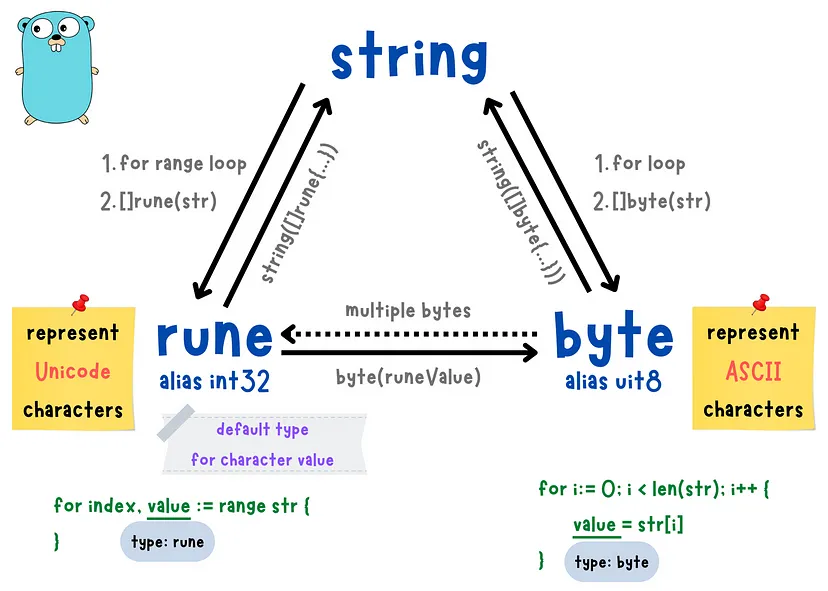
For more rune handling see the packages unicode and unicode/utf8.
Resources I used: